Let the code compare, let the AI explain
An extra set our AI trainer missed, what I tried next, and which directions I'd explore again.
After updating the workout at IZIFIT, the AI trainer told the user it was adding one repetition per set and missed the extra sets.
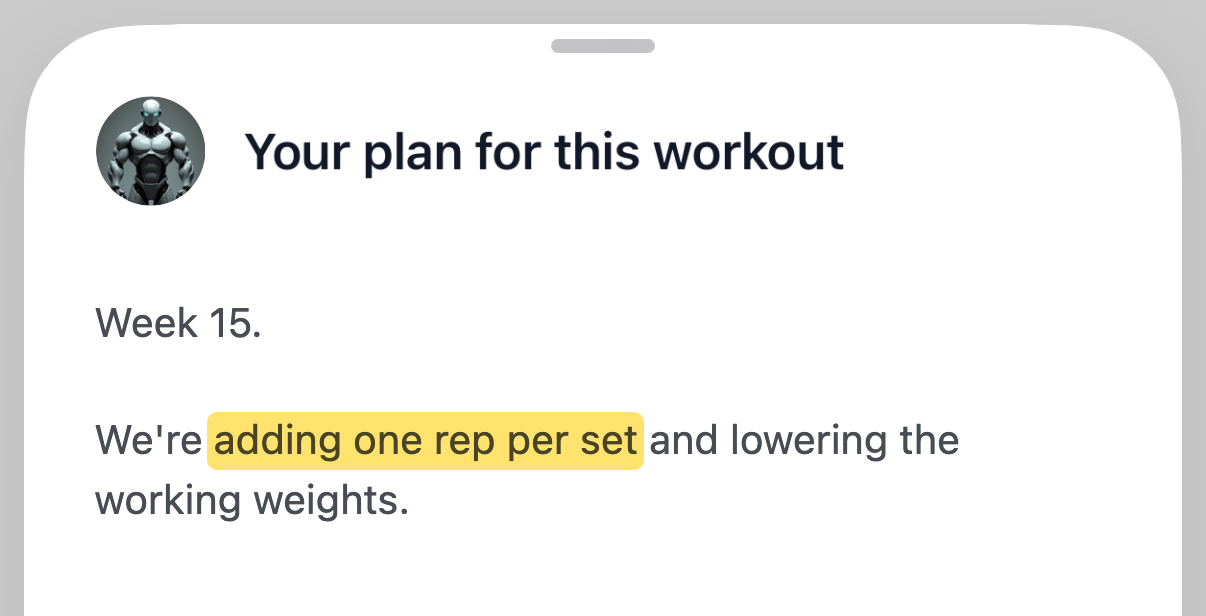
Expected: We're adding extra sets and one rep per set.
Users were reporting wrong counts like this and asking for a fix. I worked on the trainer as part of the team. I found that fast, low-cost LLMs can miscount even simple comparisons. So I tried different tricks to ship answers worth reading.
If your feature states counts, dates or prices, your users will find the same mistakes. This post shows where those tricks led. You can use them to decide what belongs in code, stop old answers from overriding current records, reuse answers safely and keep fixed mistakes fixed. These tricks have limits, but they may help you avoid some of our mistakes. A separate page shows how we checked this.
1. Do the math before asking for the explanation
If a unit test can check a fact, let code produce that fact. Then ask the model to explain it. A prompt rule is only a request. We added a rule to stop one wrong comparison, and it did. In the next review, the model broke the same rule with a different wrong comparison. So rules alone did not solve it.
Before each workout, the trainer writes a briefing. We asked a fast model to compare two lists: the planned sets and the sets from the last workout. I moved that comparison into the app, which now gives the model the result. This is a deterministic-first approach. Research on generating text from data found that splitting the plan from the wording makes the output more reliable.
If a figure is important, show it on the screen directly. Our screen now shows the app's figures above the trainer's text, before the model answers. If the model fails, the figures stay.
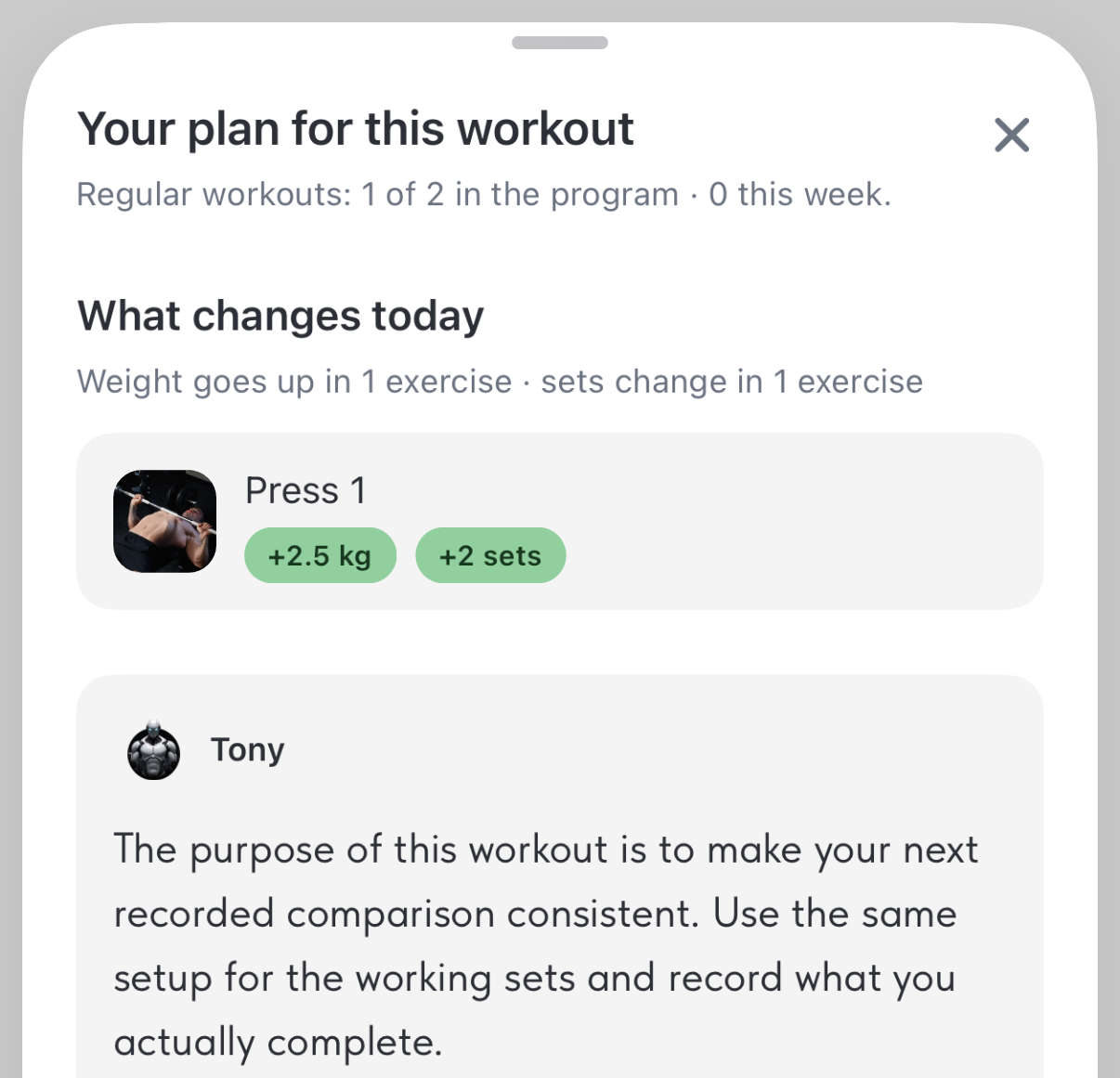
The app computed the +2.5 kg and +2 sets; the rest is test data.
The catch: your code can be wrong too. Ours counted sets the user left untouched in the last log, so the difference could shrink or reverse. Next I'd explore placeholders the code fills in, and tool calling, which newer models do reliably.
2. A perfect count can still tell the wrong story
Correct figures can still mislead. Say what each figure means before you calculate it: which event counts, which period applies, which records belong. If your label is wrong, the model repeats it. A semantic layer solves this by defining each metric once.
The first screen also says "Week 15," and that was wrong too. The number counted how many times that workout had come up. Our label called it a week, so the model did too.
The catch: edge cases keep exposing gaps. Test late completions and empty weeks. Keep missing records as unknown. If you read them as zero, a normal exercise shows "+4 sets."
3. Yesterday's answer can become tomorrow's mistake
Then the trainer started arguing with the app. Give each kind of fact one source: the current plan for weights, logs for past performance, the user's latest message for goals and how they feel. The model's own old answers come last, because a model reads an old answer as a fact.
The app lowered the next weight after a hard set. The trainer said to add 1 to 2 kg. When the user questioned that, it said adding was a mistake. That makes three answers to one question, and the trainer invented two of them. So the app now owns the next weight, and the trainer quotes it. We tested that rule. With no chat history, the trainer obeyed it. With its old answers in the history, the trainer broke it.
This mistake is called context poisoning, and the wider field is context engineering. Microsoft and Salesforce researchers found that after an early wrong turn, models struggle to recover. If your stale facts come from retrieved documents, explore time-aware RAG instead.
The catch: we send the model only recent messages, a sliding window. An old answer can stay in that window for weeks.
4. Don't ask twice when nothing has changed
If nothing changed, reopening a workout should not call the model again. Save each answer under a hash of its inputs, plus a version number you can raise by hand. If an input changes, the hash changes, and the app writes a new answer. You have nothing to clear by hand.
A new prompt or model does not change the hash. So to fix saved briefings after the extra-set mistake, we raised the version.
This is an exact-key cache. I'd skip semantic caching here. It matches similar questions, so it can return an answer built on different numbers.
The catch: if you leave an input out of the hash, the app shows a wrong answer from the cache.
5. Keep the facts fixed, give the voice room
When code owns the figures, you don't need a rule for every sentence. Give the model the full context and a clear job. Anthropic calls this the right altitude: not brittle if-else rules, and not vague guidance.
I learned this by going too far. I tightened the briefing so the model could only extract what the records supplied. The model stopped inventing, but it also stopped helping. It only reworded the exercise catalog:
Bench press: before each rep, keep your feet planted and your shoulder blades set on the bench...
We restored the full context and told it to explain what the program intends, not what the user achieved.
The catch: more freedom means more variation, and no evaluation tells you whether the voice helps. Try it with users.
6. Turn the last mistake into the next check
Save each reported mistake as a test. Write down what the answer must keep. Then decide what checks it: code, a model or a person. These are regression evals: a fix can come undone with the next prompt or model, and a saved test catches it.
One extra set must remain one extra set. Missing records must remain unknown. An old answer must not overrule the current plan. Encouragement must not invent progress that has not happened.
Code checks the counts. To check wording, teams often use a model as a judge. Test the judge first. Give it pairs of answers where you know the better one, and show each pair in both orders. Our judge found the invented facts we planted. But it preferred an answer only because it added encouragement. It also rated one answer as fine or as a serious failure, depending on which answer came first. Plant the hard kind too: a claim that sounds sourced but isn't. With one prompt, the trainer wrote "heavier weights than when you started." The records did not support that. Our judge accepted it. A coding agent checked it against the records and rejected it.
The catch: checks pile up, and each one narrows what the model may say. So we deleted the tests that required exact wording.
Start with the mistake you already have
The code owns the figures and what they mean; the model explains them. Old answers rank last, and saved answers are stored with a hash of their inputs. Reported mistakes become checks, but keep distilling and revisiting them, or you'll build a deterministic answer machine out of an LLM.
The best first step: take the last wrong number a user reported, move the comparison behind it into code, and run that case again.
Which decision in your AI feature could be settled before the model answers? Tell me on LinkedIn.
I build AI products from research to release: work with me.